mirror of
https://github.com/TrezOne/docker-mods-uptime-kuma-timeout-fix.git
synced 2026-06-26 10:12:46 -04:00
 TheCaptain989
177 lines
10 KiB
Markdown
177 lines
10 KiB
Markdown
A [Docker Mod](https://github.com/linuxserver/docker-mods) for the LinuxServer.io Radarr/Sonarr Docker container that adds a script to automatically strip out unwanted audio and subtitle streams, keeping only the desired languages.
|
|
Chapters, if they exist, are preserved. The Title attribute in the MKV is set to the movie title plus year (ex: `The Sting (1973)`) or the series title plus episode information (ex: `Happy! 01x01 - What Smiles Are For`).
|
|
|
|
**One unified script works in both Radarr and Sonarr. Use this mod in either container!**
|
|
>**NOTE:** This mod support Linux OSes only.
|
|
|
|
Container info:
|
|

|
|
|
|
# Installation
|
|
>**NOTE:** See the [Sonarr/Radarr v3 Builds](./README.md#sonarrradarr-v3-builds) section below for important differences to these instructions for v3 builds.
|
|
|
|
1. Pull your selected container ([linuxserver/radarr](https://hub.docker.com/r/linuxserver/radarr "LinuxServer.io's Radarr container") or [linuxserver/sonarr](https://hub.docker.com/r/linuxserver/sonarr "LinuxServer.io's Sonarr container")) from Docker Hub:
|
|
`docker pull linuxserver/radarr:latest` OR
|
|
`docker pull linuxserver/sonarr:latest`
|
|
|
|
2. Configure the Docker container with all the port, volume, and environment settings from the *original container documentation* here:
|
|
**[linuxserver/radarr](https://hub.docker.com/r/linuxserver/radarr "Radarr Docker container")**
|
|
**[linuxserver/sonarr](https://hub.docker.com/r/linuxserver/sonarr "Sonarr Docker container")**
|
|
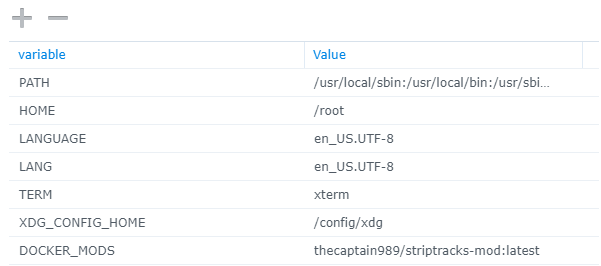
1. Add the **DOCKER_MODS** environment variable to the `docker create` command, as follows:
|
|
`-e DOCKER_MODS=linuxserver/mods:radarr-striptracks`
|
|
|
|
*Example Synology Configuration*
|
|
|
|
|
|
2. Start the container.
|
|
|
|
3. After all of the above configuration is complete, to use mkvmerge:
|
|
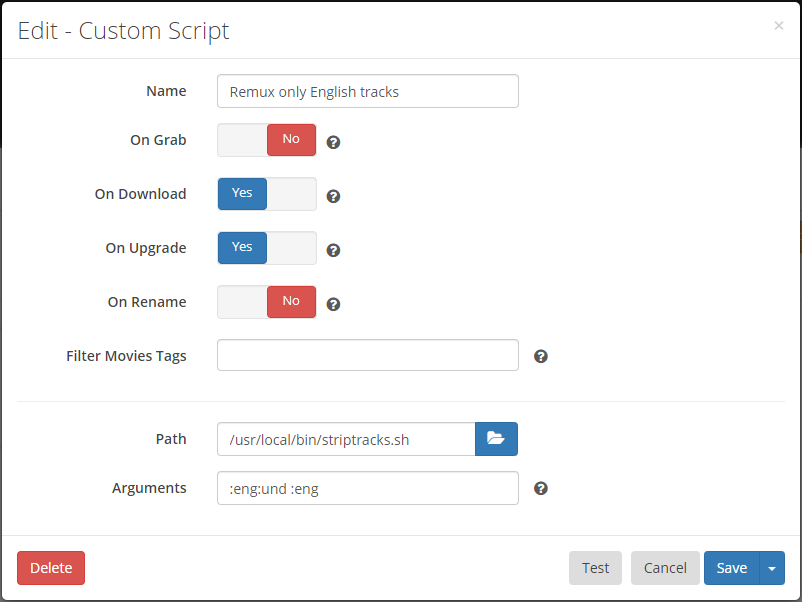
1. Configure a custom script from the Radarr/Sonnar Settings->Connect screen and type the following in the **Path** field:
|
|
`/usr/local/bin/striptracks.sh`
|
|
|
|
2. Add the codes for the audio and subtitle languages you want to keep as **Arguments** (details in the [Syntax](./README.md#syntax) section below):
|
|
<ins>Suggested Example</ins>
|
|
**`:eng:und :eng`**
|
|
|
|
## Usage
|
|
>**NOTE:** See the [Sonarr/Radarr v3 Builds](./README.md#sonarrradarr-v3-builds) section below for important differences to these instructions for v3 builds.
|
|
|
|
The source video can be any mkvtoolnix supported video format. The output is an MKV file with the same name.
|
|
|
|
If you've configured the Radarr/Sonarr Recycle Bin path correctly, the original video will be moved there.
|
|
![warning24] **NOTE:** If you have *not* configured the Recycle Bin, the original video file will be deleted/overwritten and permanently lost.
|
|
|
|
### Syntax
|
|
The script accepts two arguments and one option in the **Arguments** field:
|
|
|
|
`[-d] <audio_languages> <subtitle_languages>`
|
|
|
|
The arguments are language codes in [ISO639-2](https://en.wikipedia.org/wiki/List_of_ISO_639-2_codes "List of ISO 639-2 codes") format.
|
|
These are three letter abbreviations prefixed with a colon ':', such as:
|
|
|
|
* :eng
|
|
* :fre
|
|
* :spa
|
|
|
|
...etc.
|
|
|
|
Multiple codes may be concatenated, such as `:eng:spa` for both English and Spanish.
|
|
|
|
It is suggested to use `:eng:und :eng` if you are unsure of what to choose. This will keep English and Undetermined audio and English subtitles, if they exist.
|
|
>**NOTE:** The script is smart enough to not remove the last audio track. This way you don't have to specify every possible language if you are importing a
|
|
foreign film, for example.
|
|
|
|
The `-d` option enables debug logging.
|
|
|
|
### Examples
|
|
```
|
|
:eng:und :eng # keep English and Undetermined audio and English subtitles
|
|
-d :eng "" # Enable debugging, keeping English audio and no subtitles
|
|
:eng:kor:jpn :eng:spa # Keep English, Korean, and Japanese audio, and English and
|
|
Spanish subtitles
|
|
```
|
|
|
|
## Triggers
|
|
The only events/notification triggers that have been tested are **On Download** and **On Upgrade**
|
|
|
|
|
|
|
|
## Logs
|
|
A log file is created for the script activity called:
|
|
|
|
`/config/logs/striptracks.txt`
|
|
|
|
This log can be inspected or downloaded from the Radarr/Sonarr GUI under System->Logs->Files
|
|
|
|
Script errors will show up in both the script log and the native Radarr/Sonarr log.
|
|
|
|
Log rotation is performed with 5 log files of 512KB each being kept.
|
|
>![warning24] **NOTE:** If debug logging is enabled, the log file can grow very large very quickly. *Do not leave debug logging enabled permanently.*
|
|
|
|
___
|
|
|
|
## Sonarr/Radarr v3 Builds
|
|
>![warning] **Warning: Unstable Releases** ![warning]
|
|
>The Sonarr/Radarr v3 Builds are the unstable releases (Aphrodite and Phantom) of Radarr and Sonarr. Though the mod works with all versions of the container, I cannot guarantee these releases are stable.
|
|
|
|
<ins>Important differences for Sonarr/Radarr v3 Builds</ins>
|
|
### Mod installation
|
|
Substitute the following steps for those noted in the [Installation](./README.md#installation) section above.
|
|
1. Pull your selected container ([linuxserver/radarr](https://hub.docker.com/r/linuxserver/radarr "LinuxServer.io's Radarr container") or [linuxserver/sonarr](https://hub.docker.com/r/linuxserver/sonarr "LinuxServer.io's Sonarr container")) from Docker Hub:
|
|
`docker pull linuxserver/radarr:preview` OR
|
|
`docker pull linuxserver/sonarr:preview`
|
|
|
|
2. Configure the Docker container with all the port, volume, and environment settings from the *original container documentation* here:
|
|
**[linuxserver/radarr](https://hub.docker.com/r/linuxserver/radarr "Radarr Docker container")**
|
|
**[linuxserver/sonarr](https://hub.docker.com/r/linuxserver/sonarr "Sonarr Docker container")**
|
|
1. Add the **DOCKER_MODS** environment variable to the `docker create` command, as follows:
|
|
`-e DOCKER_MODS=linuxserver/mods:radarr-striptracks`
|
|
|
|
*Example Synology Configuration*
|
|

|
|
|
|
2. Start the container.
|
|
|
|
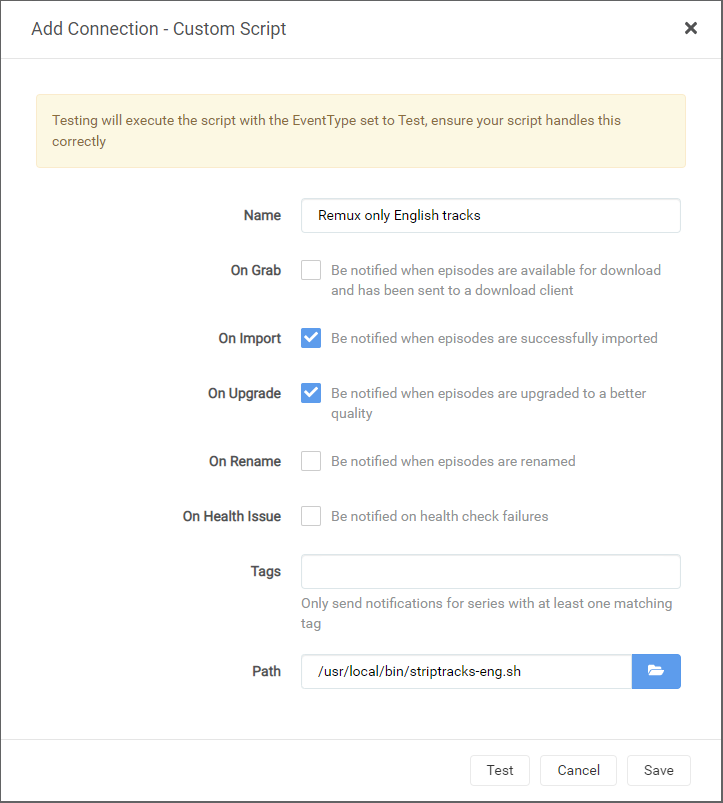
3. After the above configuration is complete, to use mkvmerge, configure a custom script from the Settings->Connect screen and type the following in the **Path** field:
|
|
|
|
`/usr/local/bin/striptracks-eng.sh`
|
|
|
|
<ins>This is a wrapper script that calls striptracks.sh with the following arguments, which keep English audio and subtitles only!</ins>
|
|
`:eng:und :eng`
|
|
|
|
*For any other combinations of audio and subtitles you **must** either use one of the [included wrapper scripts](./README.md#included-wrapper-scripts) or
|
|
create a custom script with the codes for the languages you want to keep. See the [Syntax](./README.md#syntax) section above.
|
|
Do not put `striptracks.sh` in the **Path** field!*
|
|
|
|
### Included Wrapper Scripts
|
|
>**NOTE:** The **Arguments** field for Custom Scripts was removed in Radarr and Sonarr v3 due to security concerns. To support options with this version and later,
|
|
a wrapper script can be manually created that will call *striptracks.sh* with the required arguments.
|
|
|
|
For your convenience, several wrapper scripts are included in the `/usr/local/bin/` directory.
|
|
You may use any of these scripts in place of the `striptracks-eng.sh` mentioned in the [Mod installation](./README.md#mod-installation) section above.
|
|
|
|
```
|
|
striptracks-dut.sh # Keep Dutch audio and subtitles
|
|
striptracks-eng.sh # Keep English and Undetermined audio and English subtitles
|
|
striptracks-eng-debug.sh # Keep English and Undetermined audio and English subtitles, and enable debug logging
|
|
striptracks-eng-jpn.sh # Keep English, Japanese, and Undetermined audio and English subtitles
|
|
striptracks-fre.sh # Keep French audio and subtitles
|
|
striptracks-fre-debug.sh # Keep French audio and subtitles, and enable debug logging
|
|
striptracks-ger.sh # Keep German audio and subtitles
|
|
striptracks-spa.sh # Keep Spanish audio and subtitles
|
|
```
|
|
|
|
### Example Wrapper Script
|
|
To configure the last entry from the [Examples](./README.md#examples) section above, create and save a file called `wrapper.sh` to `/usr/local/bin` containing the following text:
|
|
```
|
|
#!/bin/bash
|
|
|
|
. /usr/local/bin/striptracks.sh :eng:kor:jpn :eng:spa
|
|
```
|
|
Then put `/usr/local/bin/wrapper.sh` in the **Path** field in place of `/usr/local/bin/striptracks-eng.sh` mentioned in the [Mod installation](./README.md#mod-installation) section above.
|
|
|
|
### Preview Triggers
|
|
The only events/notification triggers that have been tested are **On Import** and **On Upgrade**
|
|
|
|
|
|
|
|
### Preview Logs
|
|
The log can be inspected or downloaded from the Radarr/Sonarr GUI under System->Log Files
|
|
|
|
___
|
|
|
|
# Credits
|
|
|
|
This would not be possible without the following:
|
|
|
|
[Radarr](http://radarr.video/ "Radarr homepage")
|
|
[Sonarr](http://sonarr.tv/ "Sonarr homepage")
|
|
[LinuxServer.io Radarr](https://hub.docker.com/r/linuxserver/radarr "Radarr Docker container") container
|
|
[LinuxServer.io Sonarr](https://hub.docker.com/r/linuxserver/sonarr "Sonarr Docker container") container
|
|
[LinuxServer.io Docker Mods](https://hub.docker.com/r/linuxserver/mods "Docker Mods containers") project
|
|
[MKVToolNix](https://mkvtoolnix.download/ "MKVToolNix homepage") by Moritz Bunkus
|
|
The AWK script parsing mkvmerge output is adapted from Endoro's post on [VideoHelp](https://forum.videohelp.com/threads/343271-BULK-remove-non-English-tracks-from-MKV-container#post2292889).
|
|
|
|
[warning]: http://files.softicons.com/download/application-icons/32x32-free-design-icons-by-aha-soft/png/32/Warning.png "Warning"
|
|
[warning24]: http://files.softicons.com/download/toolbar-icons/24x24-free-pixel-icons-by-aha-soft/png/24x24/Warning.png "Warning"
|