 TheCaptain989
d6d6f069f3
TheCaptain989
d6d6f069f3
# What's Changed
- **New** Uses semantic versioning
- **New** Added installation script and documentation for hotio containers
- **Fixes** TheCaptain989/radarr-striptracks#73
- Light editing of README
  - Added GHCR pull counts
- Updated Docker image labeling
4.0 KiB
About
This mod can now be used with hotio containers by using the method described in the hotio FAQ to install it. (This method relies on s6-overlay v2 behavior still working, though v3 is the current version.)
This is a quick and dirty script with minimal testing or error checking. Note that it only runs inside the hotio container.
Installation
-
Download the 99-striptracks.sh install script and save it somewhere that can be mounted by your container.
Example location:
/volume1/docker/99-striptracks.shExample curl line to download the installation script:
curl -s https://raw.githubusercontent.com/TheCaptain989/radarr-striptracks/master/hotio/99-striptracks.sh >/volume1/docker/99-striptracks.sh -
Make it executable:
chmod +x /volume1/docker/99-striptracks.sh -
Pull your selected container (hotio/radarr or hotio/sonarr) from GitHub Container Registry or Docker Hub:
docker pull ghcr.io/hotio/radarr:latestOR
docker pull ghcr.io/hotio/sonarr:latest -
Configure the Docker container with all the port, volume, and environment settings from the original container documentation here:
hotio/radarr
hotio/sonarrNote: Notice that no environment variables are used in this setup. That is a specific feature of LSIO containers and is not applicable to hotio containers.
-
Add the 99-striptracks.sh file path as a mount point in your
compose.ymlfile ordocker runcommand.Note: The
/etc/cont-init.d/99-striptrackspath below is important; don't change it!Example Docker Compose YAML Configuration
services:
  sonarr:
      container_name: sonarr
      image: ghcr.io/hotio/sonarr
      ports:
      - "8989:8989"
      environment:
      - PUID=1000
      - PGID=1000
      - UMASK=002
      - TZ=Etc/UTC
      volumes:
      - /<host_folder_config>:/config
      - /<host_folder_data>:/data
      - /volume1/docker/99-striptracks.sh:/etc/cont-init.d/99-striptracks
Example Docker Run Command
docker run --rm \
     --name sonarr \
     -p 8989:8989 \
     -e PUID=1000 \
     -e PGID=1000 \
     -e UMASK=002 \
     -e TZ="Etc/UTC" \
     -v /<host_folder_config>:/config \
     -v /<host_folder_data>:/data \
     -v /volume1/docker/99-striptracks.sh:/etc/cont-init.d/99-striptracks \
     ghcr.io/hotio/sonarr
Example Synology Configuration
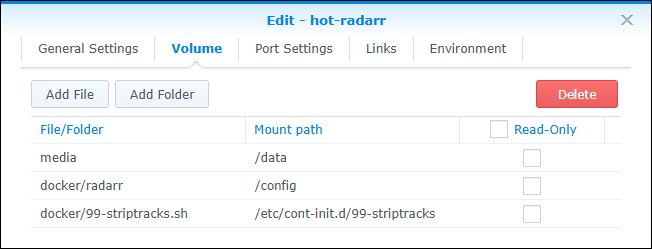
Note: Please be sure that your mount points for
/configand/dataabove do not overlap with the newly added mount point! -
Start the container.
-
-
After the container has fully started, continue with Installation step 3 in the previous README.

Requirements
You must have the bash shell available in your host path. You might attempt editing the shebang in the 99-striptracks.sh script to get around this, but that is beyond the scope of this document.
Known Problems
On at least some Synology hosts that use the ash shell, this script will cause the container to abort and not start. If this happens, check your container logs for hints as to what may be wrong.